If you use passwords, there’s a good chance you’re doing them wrong and exposing yourself to unnecessary risk.
My intent is provide some basic information on how you can do passwords better1, suitable for grandma to use (no offense grandma), because there’s no reason that you can’t do passwords better.
Why We Have Passwords
In the beginning, the internet was a benevolent place. If I said I was fergbrain, everyone knew I was fergbrain. I didn’t need to prove I was fergbrain. Of course, that didn’t last long and so passwords were created to validate that I was, in fact, fergbrain.
Passwords are one of three ways in which someone can authenticate who they are:
Password: something you know
Token: something you have that can’t be duplicated (such as an RSA token or YubiKey)
Biometric: something you are (such as a fingerprint or other biometric marker unique to you)
Back In The Day™, passwords were the de facto method of authentication because they were the easiest to implement and in many ways still are.
Having just one password is easy enough, especially if you use it often enough. But how many places do you need to use a password? Email, social media, work, banking, games, utilities…the list goes on.
It would be pretty hard to remember all those different passwords. So we do the only thing we believe is reasonable: we use the same password. Or maybe a couple of different passwords: one for bank stuff, another for social media, maybe a third one for email.
Why Passwords Can Be a Problem
Bad guys know that most people use the same username, email address, and password for multiple services. This creates a massive incentive for bad guys to try and get that information. If the bad guys can extract your information from one web site, it’s likely they can use your hacked data to get into your account at other web sites.
For bad guys, the most bang for the buck comes from attacking systems that store lots of usernames and passwords. And this is how things have gone. Over just the last two years Kickstarter, Adobe, LinkedIn, eHarmony, Zappos.com, last.fm, LivingSocial, and Yahoo have all been hacked and had passwords compromised. And those are just the big companies.
In my opinion, most people know they have bad passwords, but don’t know what to do about it. It’s likely your IT person at work4 keeps telling you to make “more complex” passwords, but what does that mean? Does it even help? What are we to do about this? Can we do anything to keep ourselves safer?
How to do Passwords Better
There is no single best way to do passwords. The best way for any particular person is a compromise between security, cost, and ease of use.
There are several parts to doing passwords better:
Have Unique Passwords
If one web site is hacked, that should not compromise your data at another web site. Web sites generally identify you by your username (or email address) and password. You could have a different username for every single web site you use, but that would probably be more confusing (and could possible lead to personality disorder). Besides, having to explain to your friends why you go by TrogdorTheMagnificent on one site but TrogdorTheBold on another side would get tiring pretty quick.
For reasons which I hope are obvious, making your passwords unique is better than making your usernames unique. Unless you don’t want people to find you, then make both your username and password unique.
General Rule of Thumb
Passwords should be unique for each web site or service.
Why: If a unique passwords is compromised (e.g. someone hacked the site), the compromised password cannot be used to gain access to additional resources (i.e. other web sites)
If you’re asking yourself, “But how do I remember all those passwords?!” just hold your horses.
Choose better passwords
People suck…at picking good passwords.
If you choose your own passwords, here’s a little test:
For the 1st character in your password, give yourself 4 points.
For 2nd through 8th character in your password, give yourself 2 points for each character.
For the 9th through 20th character in your password, give yourself 1.5 points.
If you password has upper case, lower case, and numbers (or special characters), give yourself an additional 6 points.
If your password does not contain any words from the dictionary, give yourself an additional 6 points.
If you score 44 points or more, you have a good password!
If you score between 21 and 44 points, your password sucks.
If you score 20 points or less, your password really sucks.
If my password was, for example, Ferguson86Gmail, I would only have 34.5 points:
F: 4 points
erguson: 2 points each, 14 points
86gmail: 1.5 points each, 10.5 points
I have uppercase, lowercase, and a number: 6 points
“Ferguson” and “gmail” are both considered dictionary words, so I get no extra points
Instead choosing Ferguson86Gmail as my password, what if my password was Dywpac27Najunst? The password is still 15 characters long, it still has two capital letters, and it still has two numbers. However, since it’s randomly generated it would score 89.3 — over twice as many points as the password I choose.
What’s going on here?
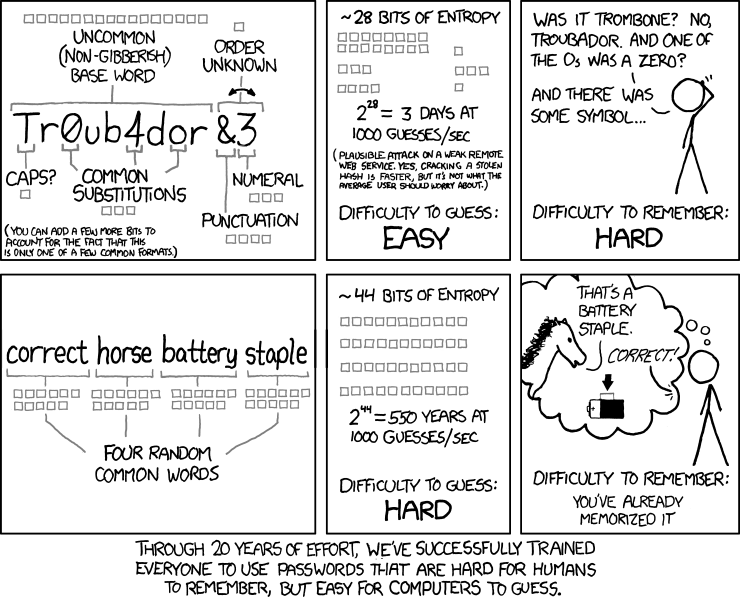
When you make up your own password, such as Ferguson86Gmail, you’re not choosing it at random and thus your password will not have a uniform random distribution of information5.
Passwords chosen by users probably roughly reflect the patterns and character frequency distributions of ordinary English text, and are chosen by users so that they can remember them. Experience teaches us that many users, left to choose their own passwords will choose passwords that are easily guessed and even fairly short dictionaries of a few thousand commonly chosen passwords, when they are compared to actual user chosen passwords, succeed in “cracking” a large share of those passwords.6
The “goodness” of a password is measured by randomness, which is usually referred to as bits of entropy (which I cleverly disguised as “points” in the above test) the reality of the situation is that humans suck at picking their own passwords.
More Entropy!
If more entropy leads to better passwords, let’s look at what leads to more bits of entropy in a password. The number of bits of entropy, H, in a randomly generated password (versus a password you picked) of length, L, is:
Where N is the number of characters possible. If you use only lowercase letters, N is 26. If you use lower and uppercase, N is 52. Adding numbers increases NÂ to 62.
For example:
mougiasw is an eight-character all lowercase password that has bits of entropy.
gLAviAco is an eight-character lowercase and uppercase password that has bits of entropy
Pr96Regu is an eight-character lowercase, uppercase, and numeric password that has bits of entropy.
Adding uppercase gets us 8 additional bits, but adding numbers only nets us 2 additional bits of entropy. However, look what happens when we just add additional characters instead:
vubachukus is a ten-character all lowercase password that has bits of entropy.
neprajubrawa is a twelve-character all lowercase password that has bits of entropy.
For every additional character, you add bits of entropy. And unlike expanding the character set (e.g. using uppercase letters and/or numbers and/or special characters), you get more bits of entropy for every additional character you extend your password by…not just the first one.
The good news is that for randomly generated passwords, increasing the length by one character increases the difficulty to guess it by a factor of 32. The bad news is that for user selected passwords, every additional character added to make a password longer only quadruples the difficulty (adds roughly 2 bits of entropy which, based on NIST Special Publication 800-63 Rev 1 for the first 12 characters of a password).
More bits of entropy is better and I usually like to have at least 44 bits of entropy in my passwords. More is better.
Having to break out a calculator to determine the entropy of your passwords is not easy, and passwords should be easy. So let’s make it easy:
General Rule of Thumb<
Longer passwords (at least ten characters long) are better than more complex passwords.
Why: Adding complexity only provides a minimal and one time benefit. Adding length provides benefit for each character added and is likely to be easier to remember.
Track Your Passwords
The inevitable reality of doing passwords better is that you need a way to keep track of them. There simply is no way a person can keep track of all the different passwords for all the different sites.
This leaves us with two other options:
Write Down Your Passwords
Yes. Writing your passwords down in a safe place is an acceptable method of keeping track of your passwords: From www.schneier.com:
Simply, people can no longer remember passwords good enough to reliably defend against dictionary attacks, and are much more secure if they choose a password too complicated to remember and then write it down. We’re all good at securing small pieces of paper. I recommend that people write their passwords down on a small piece of paper, and keep it with their other valuable small pieces of paper: in their wallet.
Writing down passwords can be appropriate because the most common attack vector is online (i.e. someone you’ve never even heard of trying to hack into your account from half-a-world away) with the following caveat: you make them more unique and more entropic.
By writing down passwords, you can increase their entropy (i.e. making them harder to guess) since you don’t have to memorize them. And since you don’t have to memorize them, you are more likely to create a better password. Additionally, if you write your passwords down, you don’t have to remember which password goes with which account so you can have a different password for each account: this also increases password uniqueness.
Encrypt Your Passwords
It would be reasonable to obfuscate your password list — instead of just writing them down in plaintext — so that if someone were to riffle through your wallet, they wouldn’t immediately recognize it as a password list or know exactly which passwords go with which accounts.
Instead of keeping them on a piece of paper, you could use a program to encrypt your passwords for you. There are a variety of ways to safely encrypt and store your passwords on your computer. I have been using 1Password for several years now and have been very impressed with their products7.
KeePass is another password manager I’ve used, however it does not have good support for OSX. There are other systems one could use, including Password Safe YubiKey.
I tend to be leery of web-based systems, such as LastPass and Passpack for two reasons:
Having lots of sensitive data stored in a known location on the internet is ripe for an attack.
The defense against such an attack is predicated on the notion that the company has implemented their encryption solution correctly!
General Rule of Thumb
You don’t have to remember your passwords.
Why: It’s better to have unique and more entropic passwords than it is to never write down your password.
That’s it! Hopefully you found this helpful, now go make your passwords better and report back!
19 February 2014: Added additional clarification about entropy of user-generated versus randomly-generated passwords.
Arguably, there is no one right way to do passwords ↩
it’s one thing to prove the mathematics of something, it’s a whole other thing to release a suitable product ↩
Six months ago, primarily in light of the issues concerning the NSA’s use of what I believe to be unconstitutional searches I started the process of moving my email system (which is also the email system my family and extended family uses) away from Google Apps.
Last week, I completed the technical transition to the new mail system provided by FastMail.
Today, the fight continues. I called both my Senators, as well as my Representative…yes, I called them. On the phone.
I talked to a live human being and I told them what I thought:
I’d like my Senator / Representative to support and co-sponsor H.R. 3361 / S. 1599, the USA Freedom Act. I would also like my Senator / Representative to oppose S. 1631, the so-called FISA Improvements Act. Moreover, I’d like like my Senator / Representative to work to prevent the NSA from undermining encryption standards.
After missing MVP Gold by about 2000 miles last year, I started 2013 back at square one:
I started climbing back up the points ladder again, hitting up two new states: Pennsylvania and Missouri, as well as one new country: Honduras!
Seattle, WA*
San Diego, CA
Salt Lake City, UT*
San Francisco, CA
Solomons, MD*
Chicago, IL
Bozeman, MT*
San Pedro Sula, Honduras
West Bay, Roatan Island, Honduras
La Ceiba, Honduras
Copan Ruinas, Honduras
Philadelphia, PA
Jacksonville, FL
Saint Louis, MO
One or more nights were spent in each place. Those cities marked with an asterisk (*) were visÂited mulÂtiÂple times on non-conÂsecÂuÂtive days. Roughly in order of apÂpearÂance.
Unfortunately, while I was able to secure Alaska MVP for another year, I still fell short of MVP Gold by 6,991 miles:
I neglected to share my escapades for 2012, which is a shame because I flew almost about 50,000 miles, missed Alaska Airlines MVP Gold by about 2,000 miles, and rode a train!
I added four new states and a district: New York, Maryland, Virginia, District of Columbia, and Alabama.
Billings, MT*
Seattle, WA*
New York, NY*
Islip, NY*
San Diego, CA*
Solomons, MD*
Arlington, VA*
Missoula, MT
Circle, MT
Portland, OR
Walla Walla, WA
Huntsville, AL
Bozeman, MT
Unfortunately, no international travel this year.
Rules: One or more nights were spent in each place. Those cities marked with an * were visÂited mulÂtiÂple times on non-conÂsecÂuÂtive days. Roughly in order of apÂpearÂance.
Two nights sleeping on the road (well, actually one on a plane and the other on a train).


 bits of entropy.
 bits of entropy
 bits of entropy.
 bits of entropy.
 bits of entropy.
 bits of entropy. And unlike expanding the character set (e.g. using uppercase letters and/or numbers and/or special characters), you get more bits of entropy for every additional character you extend your password by…not just the first one.


